
OpenTelemetry Manual Spans in Python Applications
Add OpenTelemetry manual spans to a Python application. See parent-child timing, safe attributes, and a checklist for missing spans.
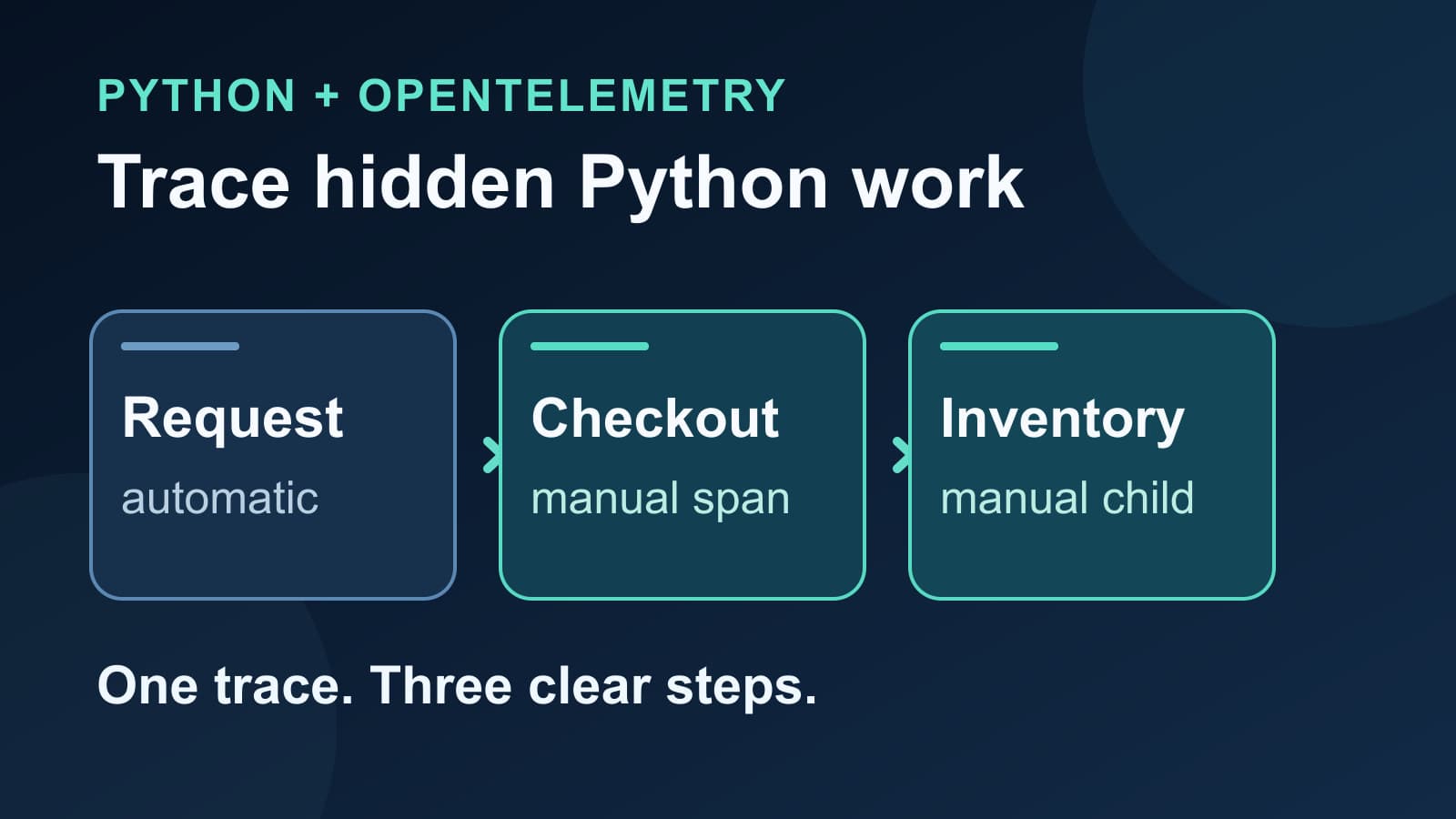
OpenTelemetry manual spans in a Python application show work that automatic instrumentation cannot name. A request span may show 600 ms of server time, while its SQL and HTTP spans explain only 150 ms. A manual span around order validation can make the missing time visible.
This guide adds two business-operation spans to an existing Python trace. It also shows how to check their parent, choose safe attributes, and find common reasons they do not appear. The code uses the standard OpenTelemetry Python API. You can send the result to any compatible trace backend.
When should you add a manual span?
Automatic instrumentation is useful for supported web frameworks, databases, and HTTP clients. It cannot know that a block of your code means “validate order” or “select discount.” Add a manual span when that operation has a clear start, end, and debugging value.
| Trace gap | Useful manual span | What it answers |
|---|---|---|
| Request time exceeds visible dependency time | checkout.validate | How long did the business rule take? |
| One operation calls several internal steps | inventory.lookup | Which step used the time? |
| A worker has no request span | jobs.reconcile | How long did the job run? |
Avoid a span for every line or loop iteration. Too many tiny spans make the trace harder to read and increase telemetry volume. The OpenTelemetry Python instrumentation guide defines current spans, nested spans, and attributes.
1. Start with one tracer provider
Your application needs an OpenTelemetry tracer provider and exporter before it can send spans. If your service already uses an OpenTelemetry setup, keep that setup. Add the manual spans to its active tracer. Do not create a second provider inside a request handler.
If you use the Tracekit Python SDK, initialize it once when the process starts:
import os

import tracekit
from opentelemetry import trace

tracekit.init(
    api_key=os.environ["TRACEKIT_API_KEY"],
    service_name="checkout-api",
)

tracer = trace.get_tracer("checkout.pricing")
The current Tracekit SDK creates an OpenTelemetry provider and an OTLP trace exporter during initialization. Keep the API key in the service environment. The Tracekit quick start also shows how to send traces from an existing OpenTelemetry exporter without using the Tracekit SDK.
If you use an existing provider, only the trace.get_tracer(...) line is needed here. Start the tracer after your application's provider setup. A tracer without a working exporter can create spans that never reach your backend.
2. Name the business work and keep its parent
Place start_as_current_span around the work you want to measure. It ends the span when the with block exits. A span created inside another current span becomes its child.
def validate_order(item_count: int, inventory_lookup) -> bool:
    with tracer.start_as_current_span("checkout.validate") as span:
        span.set_attribute("checkout.item_count", item_count)

        with tracer.start_as_current_span("inventory.lookup"):
            available = inventory_lookup()

        span.set_attribute("inventory.available", available)
        return available
Call validate_order while a traced request is active. For example, an instrumented Flask or FastAPI handler creates the request parent. The expected trace has this shape:
POST /checkout             automatic request span
└─ checkout.validate       manual business span
   └─ inventory.lookup     manual child span
The inventory_lookup argument stands for your existing application function. Its return value must be a boolean in this example. The span measures its execution, whether the function reads a cache, calls a service, or runs local code. If the lookup already has an automatic client span, check the trace before you add another span around the same operation.
Use stable operation names. Put variable facts in attributes instead of creating a new span name for each order. An item count and a boolean are useful here. Do not attach customer names, raw order bodies, tokens, or payment details to spans. The OpenTelemetry naming guidance explains how to name attributes consistently.
3. Check failures and missing parents
An exception that leaves a start_as_current_span block can be recorded on that span by the context manager. If your code catches and handles an error inside the block, record it where you handle it. Set the span status to error when the operation failed:
from opentelemetry.trace import Status, StatusCode

with tracer.start_as_current_span("checkout.validate") as span:
    try:
        result = validate_input()
    except ValueError as error:
        span.record_exception(error)
        span.set_status(Status(StatusCode.ERROR))
        result = False
This example handles the exception. Do not add this handler to code that must let the exception reach the caller. The official Python exception example shows the same record_exception and status methods.
If a manual span appears as a new trace, inspect the active context at its start. Common causes include a worker that starts after the request ends, a queue message without propagated context, or code that uses start_span without making that span current. The OpenTelemetry context propagation guide explains how context crosses service boundaries. A background job needs its own instrumentation or context handoff; wrapping a function alone cannot restore a missing parent.
4. Verify the trace before adding more spans
Trigger one safe test request and open its trace. Check these points in order:
- The service name is
checkout-api, or the name set by your existing provider. - The request span contains
checkout.validate. inventory.lookupappears belowcheckout.validatein the same trace.- The durations match the code path you exercised.
- The attributes contain only approved, low-risk values.
- A handled failure shows an error status and an exception event when you record one.
If no manual span appears, check that the provider initializes before the code runs. Then check exporter errors, the endpoint, authentication, sampling, and whether the test path calls the instrumented function. The OpenTelemetry exporter guide shows how an OTLP exporter sends traces. Sampling can omit a whole trace, including its manual spans.
Tracekit accepts OpenTelemetry traces and shows their parent-child timing in the distributed tracing view. The Python performance monitoring guide helps you find a slow request before you decide where a manual span belongs. For a FastAPI request with database and HTTP child spans, use the FastAPI tracing guide.
Start with one unexplained operation. Add a span, confirm its parent and duration, then decide whether a second span answers a different question. A small trace with clear names is more useful than a large trace with no clear decision path.
Related Posts

FastAPI Tracing with OpenTelemetry: A Practical Setup
Set up FastAPI tracing with OpenTelemetry. Connect request, SQLAlchemy, and HTTPX spans, then verify trace context across services.
Python Application Performance Monitoring with OpenTelemetry
Set up Python application performance monitoring with OpenTelemetry. Measure latency, errors, throughput, and dependency spans across production requests.
How to Correlate Logs with Traces When Debugging
Correlate logs with traces using trace IDs, span IDs, and a request test. Find missing context across services without relying on timestamps alone.