
FastAPI Background Tasks: Production Checklist
Use this FastAPI background tasks production checklist to test completion, failures, trace context, resource lifetime, and queue decisions.
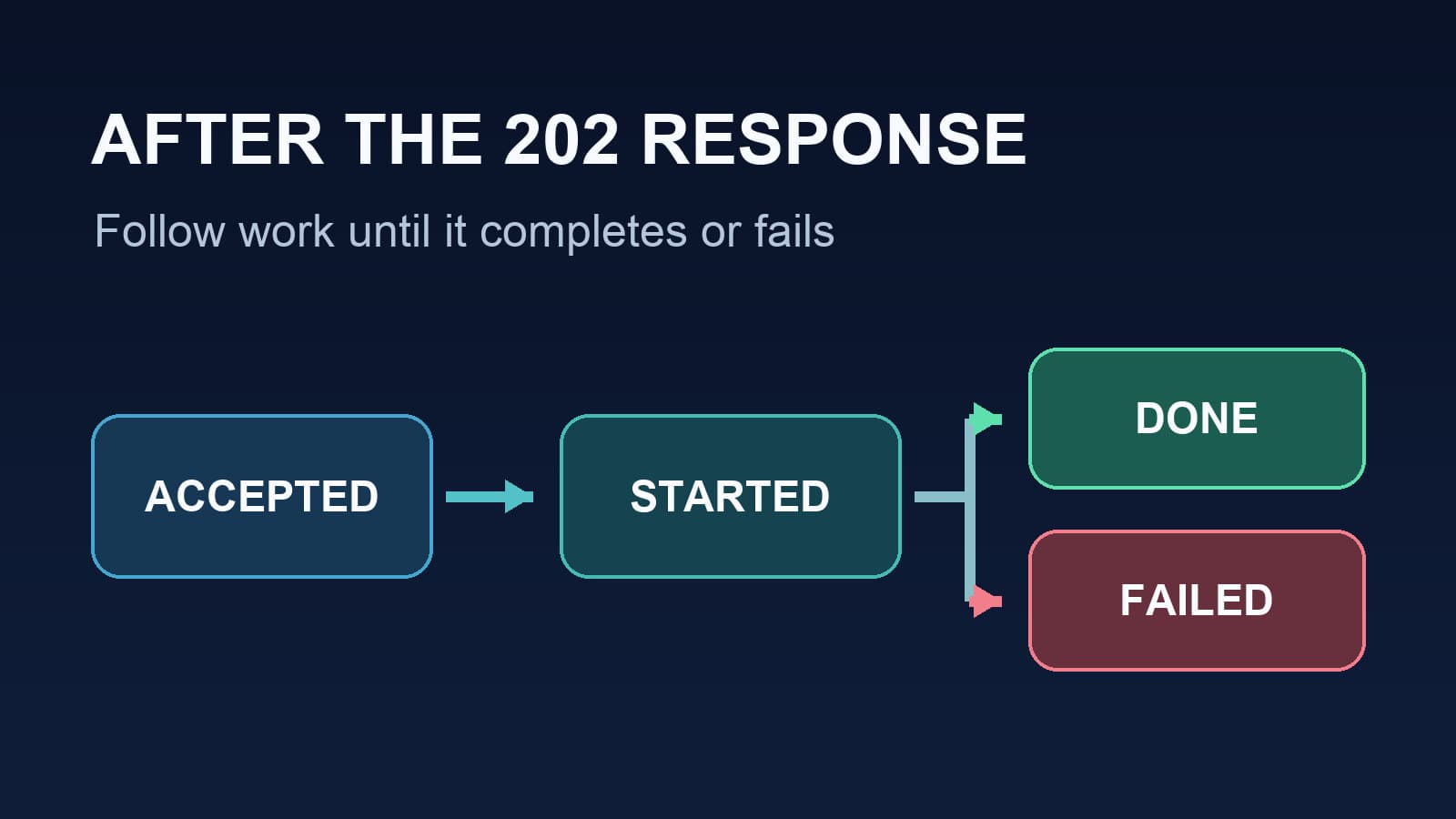
A FastAPI background tasks production checklist must test what happens after the HTTP response. A 202 Accepted response proves that the server accepted a request. It does not prove that its background task started, completed, or survived a restart.
Use the checks below for FastAPI BackgroundTasks, which run in the application process. The FastAPI documentation describes this behavior. If the work must survive a process exit, use a durable queue and test its worker separately.
The task lifecycle you must see
| Stage | Evidence to record | What a missing stage means |
|---|---|---|
| Accepted | Operation ID and response time | The request did not schedule work |
| Started | Task name, start time, and operation ID | Work may still wait or may have been lost |
| Completed | End time and result state | A successful response has no proof of delivery |
| Failed | Error signal and operation ID | A post-response failure can stay hidden |
Record these stages in an operation store when a user needs a reliable status. In-process counters and traces help with diagnosis. They do not make delivery durable.
The broader FastAPI observability checklist covers request latency, errors, dependencies, and releases. This guide tests the task boundary in detail.
1. Decide whether BackgroundTasks is safe
Use BackgroundTasks for short, best-effort work that may stop when the process stops. FastAPI recommends a separate system, such as Celery, for heavy work across processes or servers. It does not provide a durable queue through BackgroundTasks alone.
| Question | If the answer is yes |
|---|---|
| Must the task finish after a restart? | Put it in a durable queue. |
| Does a user need a reliable completion status? | Store an operation record outside the process. |
| Can the task run much longer than a request? | Measure it and consider a separate worker. |
| Can duplicate execution cause harm? | Add an idempotency key or a safe state transition. |
| Can a task fail without changing the response? | Add a task-level failure signal. |
A receipt email may fit best-effort work. A payment capture or order state change usually needs durable delivery. Choose from the consequence of lost work, not from a fixed time limit.
2. Give the task its own trace and outcome
A request span can end before post-response work finishes. Create a named task span, then record a separate outcome. Pass a stable operation ID into the task. Do not infer success from the HTTP status.
This example assumes that your application already configures an OpenTelemetry tracer provider and exporter. The OpenTelemetry Python instrumentation guide explains that setup. The function send_receipt represents your application code.
from fastapi import BackgroundTasks, FastAPI
from opentelemetry import context, trace
from opentelemetry.trace import Status, StatusCode

app = FastAPI()
tracer = trace.get_tracer("checkout.background_tasks")


def send_receipt(order_id: str, parent_context: context.Context) -> None:
    with tracer.start_as_current_span(
        "background.send_receipt", context=parent_context
    ) as span:
        span.set_attribute("task.type", "send_receipt")
        span.set_attribute("order.id", order_id)
        try:
            # Replace this call with your task code.
            receipt_service.send(order_id)
        except Exception as error:
            span.record_exception(error)
            span.set_status(Status(StatusCode.ERROR))
            raise


@app.post("/orders/{order_id}/receipt", status_code=202)
async def request_receipt(order_id: str, tasks: BackgroundTasks):
    parent_context = context.get_current()
    tasks.add_task(send_receipt, order_id, parent_context)
    return {"status": "accepted", "order_id": order_id}
The code passes context only inside this process. A separate worker needs trace context in the queue message. Use supported instrumentation or the OpenTelemetry Python propagation guide to inject and extract it. The manual spans guide explains how to verify parent and child spans.
Keep request bodies, credentials, and customer data out of span attributes. Use stable IDs and approved metadata.
3. Test success, failure, and restart
Run these tests in staging with the same worker setup that you use in production. Keep the operation ID for each test.
| Test | Action | Pass condition |
|---|---|---|
| Success | Schedule one safe task | Accepted, started, and completed states appear. The task span has the expected parent. |
| Failure | Make the task dependency fail | The API can still return 202. A failed state and error span appear. |
| Restart | Stop the process after acceptance | The team knows whether work can be lost. Critical work resumes through a queue. |
The restart test is a design check, not a reason to stop a live production worker. A missing completion after a restart is expected for in-process work without durable recovery.
Starlette runs multiple background tasks in order. If one raises an exception, later tasks do not run. The Starlette background task reference documents this rule. Test any task chain that depends on a previous task.
4. Check resource lifetime and capacity
Pass IDs and plain values into the task. Open a new database session inside it. Do not pass a request-scoped session into work that runs after the response. FastAPI dependency guidance recommends task-owned resources.
Starlette runs synchronous background tasks in a shared thread pool. Its thread pool guide describes the default token limit and the other work that shares it. Measure task start delay, task duration, route latency, and worker restarts during a load test. A queue may be the safer choice when task demand competes with request work.
Do not place blocking I/O in an async def task. Use an async library for async work, or use a synchronous function for blocking work.
5. Connect task evidence to the request
Use an operation ID to join the HTTP response, task outcome, and trace. Check that the task span has the intended parent. If the parent is missing, inspect context propagation at the scheduling boundary. If the span is missing, check initialization, exporter errors, and sampling before you change application logic.
Tracekit accepts OpenTelemetry traces and shows their timing in its distributed tracing view. The Python integration guide covers Tracekit setup. Tracekit alert rules can cover supported service error and latency conditions. Your application must still record task outcomes; a request alert alone cannot prove task completion.
For a useful first release check, write down one accepted operation ID. Then find its task start, task result, and trace. Repeat after a controlled failure. If any stage is missing, fix that stage before you call the task production-ready.
Related Posts
FastAPI Production Observability Checklist
Use this production observability checklist for FastAPI applications to verify request metrics, traces, errors, background tasks, alerts, and releases.

FastAPI Monitoring with OpenTelemetry in Production
Monitor FastAPI routes with request metrics and OpenTelemetry traces. Check latency, errors, and downstream work before setting alerts.

FastAPI Tracing with OpenTelemetry: A Practical Setup
Set up FastAPI tracing with OpenTelemetry. Connect request, SQLAlchemy, and HTTPX spans, then verify trace context across services.