
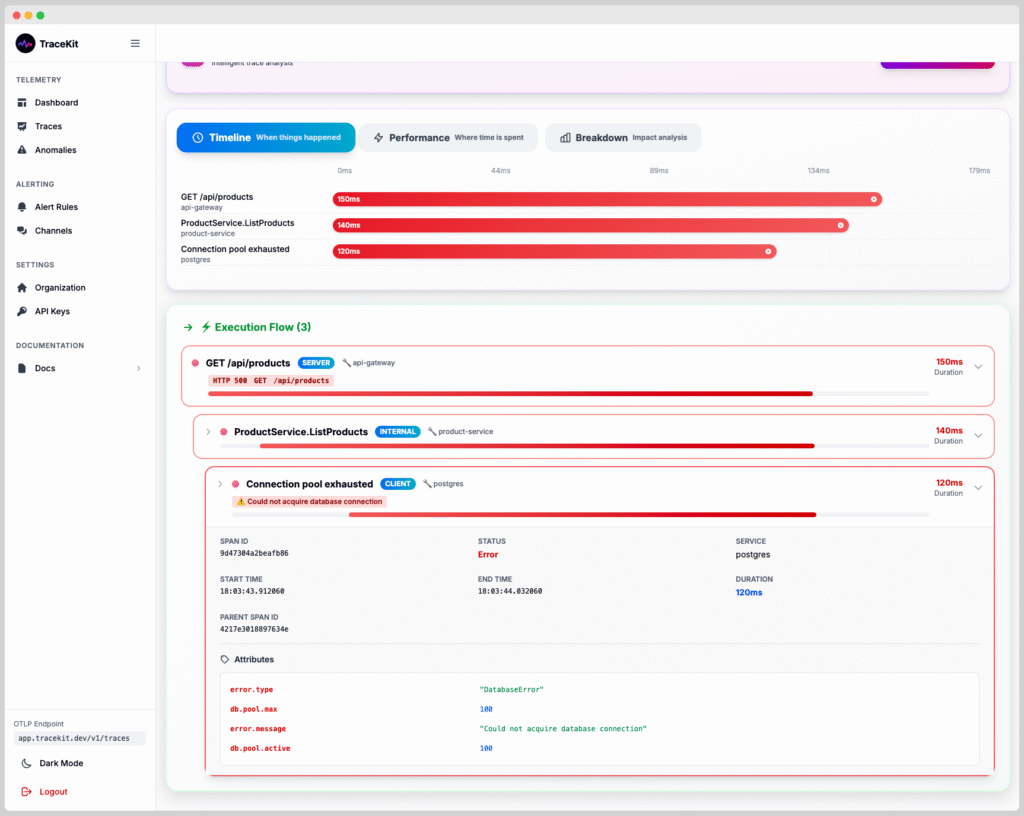
OpenTelemetry is the industry standard for observability, providing a unified way to collect telemetry data (traces, metrics, and logs) from your applications. Whether you’re building microservices, monoliths, or serverless functions, understanding OpenTelemetry is essential for modern application monitoring. This comprehensive guide covers everything you need to know about OpenTelemetry in 2025: what it is, how it works, and how to implement it in your stack.
Table of Contents
- What is OpenTelemetry?
- Why OpenTelemetry Matters
- OpenTelemetry Components Explained
- Getting Started with OpenTelemetry
- OpenTelemetry for Node.js
- OpenTelemetry for Python
- OpenTelemetry for Java
- Best Practices
- Common Mistakes to Avoid
- Frequently Asked Questions
- Next Steps
What is OpenTelemetry?
OpenTelemetry (often abbreviated as OTel) is an open-source observability framework that provides APIs, SDKs, and tools to instrument, generate, collect, and export telemetry data. It’s a Cloud Native Computing Foundation (CNCF) project that standardizes how applications expose observability data.
OpenTelemetry replaces vendor-specific instrumentation with a single, vendor-neutral standard. Instead of instrumenting your code for Datadog, New Relic, or Honeycomb separately, you instrument once with OpenTelemetry and can send data to any backend.
The Three Pillars of Observability
OpenTelemetry supports all three pillars of observability:
- Traces: Show the complete path of a request through your system
- Metrics: Numerical measurements over time (request rate, error rate, latency)
- Logs: Discrete events with timestamps and context
Why OpenTelemetry Matters
1. Vendor Neutrality
Before OpenTelemetry, switching observability tools meant rewriting instrumentation code. With OpenTelemetry, you instrument once and can switch backends without code changes.
2. Industry Standard
OpenTelemetry is backed by major tech companies (Google, Microsoft, Amazon, Datadog, New Relic) and is becoming the de facto standard. Learning it future-proofs your skills.
3. Automatic Instrumentation
OpenTelemetry provides automatic instrumentation for popular frameworks (Express, Django, Spring Boot), reducing manual work by 80%.
4. Rich Context
OpenTelemetry preserves context across service boundaries, making it possible to trace requests through complex microservices architectures.
OpenTelemetry Components Explained
1. API (Application Programming Interface)
The API defines the interfaces for creating traces, metrics, and logs. It’s language-specific but follows the same concepts across languages.
2. SDK (Software Development Kit)
The SDK implements the API and handles data collection, processing, and export. You configure the SDK with exporters, processors, and resource detectors.
3. Instrumentation Libraries
Pre-built libraries that automatically instrument popular frameworks (HTTP clients, databases, message queues) without requiring code changes.
4. Exporters
Exporters send telemetry data to backends (Jaeger, Zipkin, TraceKit, Datadog, etc.). You can use multiple exporters simultaneously.
5. Collector
The OpenTelemetry Collector is a vendor-neutral agent that receives, processes, and exports telemetry data. It acts as a buffer and can transform data before sending it to backends.
Getting Started with OpenTelemetry
The easiest way to get started with OpenTelemetry is using automatic instrumentation. Here’s a quick overview of the process:
- Install the OpenTelemetry SDK for your language
- Install automatic instrumentation libraries for your frameworks
- Configure an exporter (where to send the data)
- Initialize OpenTelemetry at application startup
- Deploy and view traces in your observability backend
OpenTelemetry for Node.js
Here’s how to add OpenTelemetry to a Node.js Express application:
Step 1: Install Dependencies
npm install @opentelemetry/api
npm install @opentelemetry/sdk-node
npm install @opentelemetry/auto-instrumentations-node
npm install @opentelemetry/exporter-trace-otlp-http
Step 2: Create Instrumentation File
// instrumentation.js
const { NodeSDK } = require('@opentelemetry/sdk-node');
const { getNodeAutoInstrumentations } = require('@opentelemetry/auto-instrumentations-node');
const { OTLPTraceExporter } = require('@opentelemetry/exporter-trace-otlp-http');

const sdk = new NodeSDK({
  traceExporter: new OTLPTraceExporter({
    url: process.env.OTEL_EXPORTER_OTLP_ENDPOINT || 'https://app.tracekit.dev/v1/traces',
    headers: {
      'Authorization': `Bearer ${process.env.OTEL_EXPORTER_OTLP_HEADERS}`,
    },
  }),
  instrumentations: [getNodeAutoInstrumentations()],
  resource: {
    'service.name': process.env.SERVICE_NAME || 'my-nodejs-app',
    'service.version': process.env.SERVICE_VERSION || '1.0.0',
  },
});

sdk.start();

console.log('OpenTelemetry initialized');
Step 3: Require Instrumentation Before Your App
// app.js - IMPORTANT: Require instrumentation FIRST
require('./instrumentation');

const express = require('express');
const app = express();

app.get('/api/users', async (req, res) => {
  // This route is automatically traced!
  const users = await fetchUsers();
  res.json(users);
});

app.listen(3000);
That’s it! All HTTP requests, database queries, and external API calls are now automatically traced.
OpenTelemetry for Python
Here’s how to add OpenTelemetry to a Python Flask application:
Step 1: Install Dependencies
pip install opentelemetry-api
pip install opentelemetry-sdk
pip install opentelemetry-instrumentation-flask
pip install opentelemetry-instrumentation-requests
pip install opentelemetry-exporter-otlp-proto-http
Step 2: Initialize OpenTelemetry
# instrumentation.py
from opentelemetry import trace
from opentelemetry.sdk.trace import TracerProvider
from opentelemetry.sdk.trace.export import BatchSpanProcessor
from opentelemetry.exporter.otlp.proto.http.trace_exporter import OTLPSpanExporter
from opentelemetry.instrumentation.flask import FlaskInstrumentor
from opentelemetry.instrumentation.requests import RequestsInstrumentor
from opentelemetry.sdk.resources import Resource

# Create resource with service name
resource = Resource.create({
    "service.name": os.getenv("SERVICE_NAME", "my-python-app"),
    "service.version": os.getenv("SERVICE_VERSION", "1.0.0"),
})

# Set up tracer
trace.set_tracer_provider(TracerProvider(resource=resource))
tracer = trace.get_tracer(__name__)

# Configure exporter
otlp_exporter = OTLPSpanExporter(
    endpoint=os.getenv("OTEL_EXPORTER_OTLP_ENDPOINT", "https://app.tracekit.dev/v1/traces"),
    headers={"Authorization": f"Bearer {os.getenv('OTEL_EXPORTER_OTLP_HEADERS')}"},
)

# Add span processor
span_processor = BatchSpanProcessor(otlp_exporter)
trace.get_tracer_provider().add_span_processor(span_processor)

# Auto-instrument Flask and requests
FlaskInstrumentor().instrument_app(app)
RequestsInstrumentor().instrument()
OpenTelemetry for Java
Here’s how to add OpenTelemetry to a Java Spring Boot application:
Step 1: Add Dependencies (Maven)
<dependencies>
  <dependency>
    <groupId>io.opentelemetry</groupId>
    <artifactId>opentelemetry-api</artifactId>
    <version>1.32.0</version>
  </dependency>
  <dependency>
    <groupId>io.opentelemetry</groupId>
    <artifactId>opentelemetry-sdk</artifactId>
    <version>1.32.0</version>
  </dependency>
  <dependency>
    <groupId>io.opentelemetry.instrumentation</groupId>
    <artifactId>opentelemetry-spring-boot-starter</artifactId>
    <version>2.1.0</version>
  </dependency>
</dependencies>
Step 2: Configure application.properties
# OpenTelemetry Configuration
otel.service.name=my-java-app
otel.service.version=1.0.0
otel.exporter.otlp.endpoint=https://app.tracekit.dev/v1/traces
otel.exporter.otlp.headers=Authorization=Bearer ${TRACEKIT_API_KEY}
Spring Boot will automatically instrument HTTP requests, database queries, and external calls.
OpenTelemetry Best Practices
1. Use Automatic Instrumentation First
Start with automatic instrumentation before adding manual spans. It covers 80% of use cases and requires zero code changes.
2. Add Custom Spans for Business Logic
Use manual instrumentation for important business operations that automatic instrumentation can’t detect:
const { trace } = require('@opentelemetry/api');

const tracer = trace.getTracer('my-service');

async function processOrder(order) {
  const span = tracer.startSpan('process-order');
  span.setAttributes({
    'order.id': order.id,
    'order.total': order.total,
    'user.id': order.userId,
  });

  try {
    await chargePayment(order);
    await sendConfirmation(order);
    span.setStatus({ code: SpanStatusCode.OK });
  } catch (error) {
    span.recordException(error);
    span.setStatus({ code: SpanStatusCode.ERROR });
    throw error;
  } finally {
    span.end();
  }
}
3. Set Meaningful Resource Attributes
Always set service.name, service.version, and deployment.environment. This helps filter and group traces:
resource: {
  'service.name': 'payment-service',
  'service.version': '2.1.0',
  'deployment.environment': 'production',
  'cloud.provider': 'aws',
  'cloud.region': 'us-east-1',
}
4. Use Sampling in Production
For high-traffic applications, use sampling to reduce data volume and costs:
import { TraceIdRatioBasedSampler } from '@opentelemetry/sdk-trace-base';

const sdk = new NodeSDK({
  sampler: new TraceIdRatioBasedSampler(0.1), // Sample 10% of traces
  // ... other config
});
5. Export to Multiple Backends
You can export to multiple backends simultaneously for redundancy or A/B testing:
import { MultiSpanExporter } from '@opentelemetry/sdk-trace-base';

const multiExporter = new MultiSpanExporter([
  new OTLPTraceExporter({ url: 'https://app.tracekit.dev/v1/traces' }),
  new OTLPTraceExporter({ url: 'https://api.datadog.com/v1/traces' }),
]);
Common Mistakes to Avoid
1. Requiring Instrumentation After App Initialization
Wrong: Requiring instrumentation after your app starts means early requests won’t be traced.
const app = express();
app.listen(3000);
require('./instrumentation'); // Too late!
Right: Require instrumentation at the very top of your entry file.
require('./instrumentation'); // First!
const app = express();
app.listen(3000);
2. Not Setting Service Name
Without a service name, traces are hard to filter and organize. Always set it explicitly.
3. Over-Instrumenting
Don’t create spans for every function call. Focus on meaningful operations: HTTP requests, database queries, external API calls, and business logic.
4. Ignoring Errors
Always record exceptions in spans and set error status:
try {
  await riskyOperation();
} catch (error) {
  span.recordException(error);
  span.setStatus({ code: SpanStatusCode.ERROR, message: error.message });
  throw error;
}
5. Not Using the Collector
For production, use the OpenTelemetry Collector as a buffer. It handles batching, retries, and can transform data before exporting.
Frequently Asked Questions (FAQ)
What is OpenTelemetry?
OpenTelemetry is an open-source observability framework that provides standardized APIs, SDKs, and tools for collecting telemetry data (traces, metrics, and logs) from applications. It’s vendor-neutral, meaning you can instrument once and send data to any observability backend.
Is OpenTelemetry free?
Yes, OpenTelemetry is completely free and open-source. The SDKs, APIs, and instrumentation libraries are free to use. You only pay for the observability backend you choose (TraceKit, Datadog, New Relic, etc.) or you can self-host open-source backends like Jaeger.
How does OpenTelemetry work?
OpenTelemetry works by instrumenting your application code (automatically or manually) to create spans (units of work) that form traces. These traces are collected by the SDK, processed, and exported to observability backends via the OpenTelemetry Protocol (OTLP). The instrumentation captures timing, context, and metadata about operations.
What’s the difference between OpenTelemetry and OpenTracing?
OpenTracing was an earlier standard for distributed tracing that was merged into OpenTelemetry in 2019. OpenTelemetry is the modern standard that supports traces, metrics, and logs, while OpenTracing only supported traces. If you’re starting new projects, use OpenTelemetry.
Do I need to rewrite my code to use OpenTelemetry?
No, OpenTelemetry provides automatic instrumentation for popular frameworks (Express, Django, Spring Boot, etc.) that requires zero code changes. You just install the SDK and instrumentation libraries, and your application is automatically traced. You can add manual instrumentation later for custom business logic.
Can I use OpenTelemetry with existing APM tools?
Yes, most modern APM tools (Datadog, New Relic, TraceKit, Honeycomb) support OpenTelemetry. You can export OpenTelemetry data to these backends using OTLP exporters. This means you can standardize on OpenTelemetry instrumentation while using your preferred observability platform.
Next Steps
Ready to implement OpenTelemetry in your application?
- Start with automatic instrumentation – It’s the fastest way to get started
- Choose an observability backend – TraceKit, Jaeger, or your preferred APM tool
- Add custom spans – Instrument important business logic
- Read the official OpenTelemetry documentation for language-specific guides
- Try TraceKit – OpenTelemetry-compatible observability platform with a free trial
OpenTelemetry is the future of observability. Start using it today to future-proof your applications.
Questions about OpenTelemetry? Start a free trial and see OpenTelemetry traces in action. Check our documentation for framework-specific OpenTelemetry guides.
