
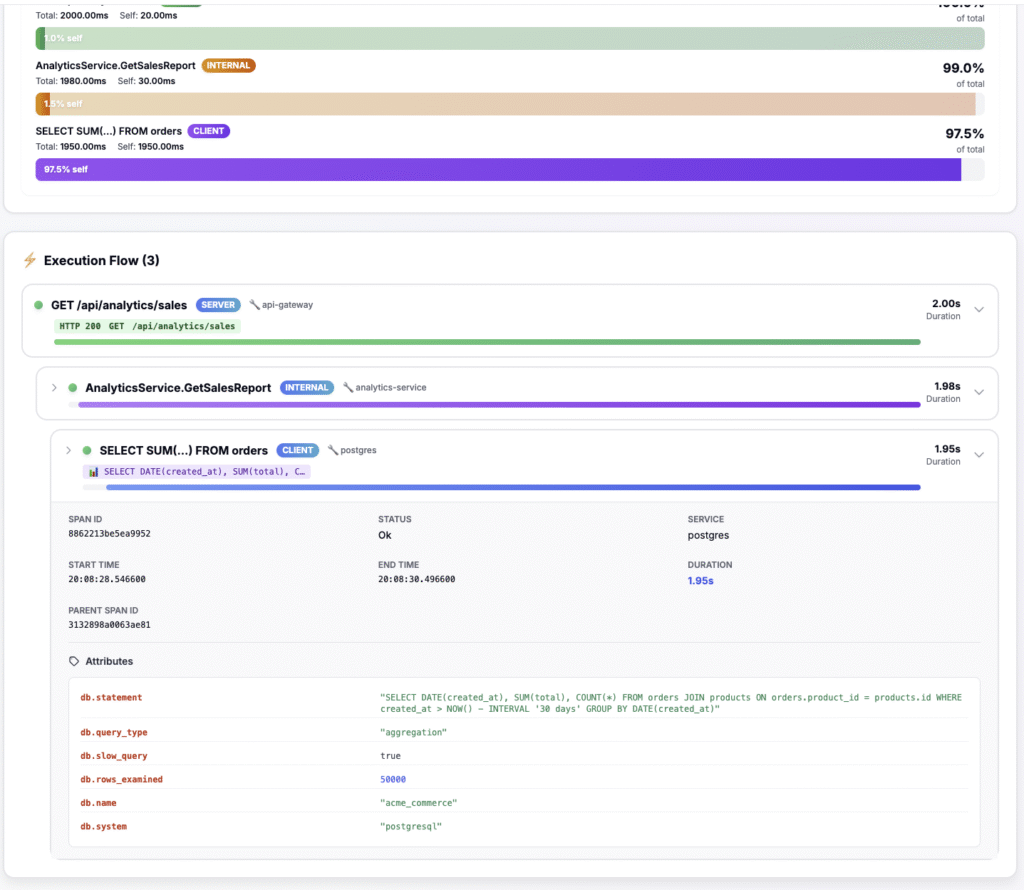
N+1 query problems are one of the most common performance issues in web applications, causing slow page loads, high database load, and poor user experience. An N+1 query problem occurs when your code makes one query to fetch N records, then makes N additional queries (one per record) to fetch related data. This guide shows you how to detect N+1 query problems using distributed tracing and flame graphs, then fix them with eager loading and other optimization techniques.
Table of Contents
- What is an N+1 Query Problem?
- Why N+1 Queries Are Bad
- How to Detect N+1 Query Problems
- Fixing N+1 Queries in Laravel
- Fixing N+1 Queries in Django
- Fixing N+1 Queries in Rails
- Fixing N+1 Queries in Node.js
- Advanced Optimization Techniques
- Preventing N+1 Queries
- Frequently Asked Questions
- Next Steps
What is an N+1 Query Problem?
An N+1 query problem happens when you fetch a collection of records, then loop through them and make additional queries for each record’s related data. The name comes from the pattern: 1 query to get N records, plus N queries to get related data = N+1 total queries.
Example: The Classic N+1 Problem
Imagine you’re building a blog and want to display a list of posts with their authors:
// Laravel example - BAD: N+1 query problem
$posts = Post::all(); // 1 query: SELECT * FROM posts

foreach ($posts as $post) {
    echo $post->author->name; // N queries: SELECT * FROM users WHERE id = ?
    // If you have 100 posts, this makes 101 queries total!
}
This code makes:
- 1 query to fetch all posts
- N queries (one per post) to fetch each author
- Total: N+1 queries
For 100 posts, that’s 101 database queries. With eager loading, you can reduce this to just 2 queries.
Why N+1 Queries Are Bad
Performance Impact
Each database query has overhead: network latency, query parsing, execution, and result transmission. Making 100 queries instead of 2 can turn a 50ms response into a 2-second response.
Database Load
N+1 queries create unnecessary load on your database server. Under high traffic, this can cause database connection pool exhaustion and slow down your entire application.
Scalability Issues
As your data grows, N+1 queries get exponentially worse. 100 posts = 101 queries. 1,000 posts = 1,001 queries. This doesn’t scale.
Real-World Example
A SaaS company we worked with had an admin dashboard that loaded in 8 seconds. After fixing N+1 queries, it loaded in 400ms—a 20x improvement. The page was making 247 database queries; after optimization, it made 12 queries.
How to Detect N+1 Query Problems
Method 1: Using Distributed Tracing and Flame Graphs
The easiest way to detect N+1 queries is using distributed tracing with flame graphs. N+1 queries create a distinctive “coral reef” pattern:
- Many small database spans at the same level
- Each span represents one query
- The pattern is immediately obvious in flame graphs
Here’s what to look for:
Flame Graph Pattern (N+1 Queries):
┌─┬─┬─┬─┬─┬─┬─┬─┬─┬─┬─┬─┬─┬─┐
│ │ │ │ │ │ │ │ │ │ │ │ │ │ │  ← 200 tiny database queries
└─┴─┴─┴─┴─┴─┴─┴─┴─┴─┴─┴─┴─┴─┘
With TraceKit, N+1 queries are automatically highlighted in traces. You’ll see warnings like “Detected 47 database queries in loop” with suggestions to use eager loading.
Method 2: Query Logging
Enable query logging in your framework to see all queries:
// Laravel: Enable query logging
DB::enableQueryLog();

// Your code here
$posts = Post::all();
foreach ($posts as $post) {
    echo $post->author->name;
}

// Check the log
dd(DB::getQueryLog()); // Shows all queries
Method 3: Database Monitoring
Monitor your database for high query counts. If you see spikes of hundreds of queries for a single page load, you likely have N+1 problems.
Fixing N+1 Queries in Laravel
For a complete guide to monitoring Laravel apps, see our Laravel observability page.
The Solution: Eager Loading
Laravel provides eager loading with the with() method:
// GOOD: Eager loading (2 queries total)
$posts = Post::with('author')->get();
// Query 1: SELECT * FROM posts
// Query 2: SELECT * FROM users WHERE id IN (1, 2, 3, ...)

foreach ($posts as $post) {
    echo $post->author->name; // No additional queries!
}
Eager Loading Multiple Relationships
// Load multiple relationships at once
$posts = Post::with(['author', 'comments', 'tags'])->get();
// Makes 4 queries total instead of potentially hundreds
Nested Eager Loading
// Load nested relationships
$posts = Post::with('comments.author')->get();
// Loads posts, their comments, and each comment's author
Conditional Eager Loading
// Only eager load when needed
$posts = Post::query();

if ($request->has('include_author')) {
    $posts->with('author');
}

$posts = $posts->get();
Lazy Eager Loading
If you’ve already loaded models, you can lazy eager load:
$posts = Post::all();
$posts->load('author'); // Load authors for already-fetched posts
Fixing N+1 Queries in Django
The Solution: select_related() and prefetch_related()
Django provides two methods for eager loading:
- select_related(): For ForeignKey and OneToOne relationships (uses JOIN)
- prefetch_related(): For ManyToMany and reverse ForeignKey relationships (uses separate queries)
Using select_related()
# BAD: N+1 queries
posts = Post.objects.all()
for post in posts:
    print(post.author.name)  # N queries

# GOOD: Eager loading with select_related
posts = Post.objects.select_related('author').all()
for post in posts:
    print(post.author.name)  # No additional queries!
Using prefetch_related()
# For ManyToMany or reverse ForeignKey
posts = Post.objects.prefetch_related('tags', 'comments').all()
for post in posts:
    for tag in post.tags.all():  # No additional queries!
        print(tag.name)
Combining Both
posts = Post.objects.select_related('author').prefetch_related('tags', 'comments').all()
Fixing N+1 Queries in Rails
The Solution: includes()
Rails provides includes() for eager loading:
# BAD: N+1 queries
posts = Post.all
posts.each do |post|
  puts post.author.name  # N queries
end

# GOOD: Eager loading
posts = Post.includes(:author).all
posts.each do |post|
  puts post.author.name  # No additional queries!
end
Eager Loading Multiple Associations
posts = Post.includes(:author, :comments, :tags).all
Nested Eager Loading
posts = Post.includes(comments: :author).all
# Loads posts, comments, and each comment's author
Using preload() vs eager_load()
Rails also provides preload() and eager_load():
- includes(): Automatically chooses the best strategy
- preload(): Always uses separate queries (like prefetch_related)
- eager_load(): Always uses LEFT OUTER JOIN (like select_related)
Fixing N+1 Queries in Node.js
Node.js ORMs also support eager loading. Here are examples for popular ORMs:
Sequelize
// BAD: N+1 queries
const posts = await Post.findAll();
for (const post of posts) {
  const author = await post.getAuthor(); // N queries
  console.log(author.name);
}

// GOOD: Eager loading
const posts = await Post.findAll({
  include: [{
    model: User,
    as: 'author'
  }]
});
for (const post of posts) {
  console.log(post.author.name); // No additional queries!
}
TypeORM
// GOOD: Eager loading
const posts = await postRepository.find({
  relations: ['author', 'comments', 'tags']
});
Prisma
// GOOD: Eager loading
const posts = await prisma.post.findMany({
  include: {
    author: true,
    comments: true,
    tags: true
  }
});
Advanced Optimization Techniques
1. Batch Loading
For complex scenarios, use batch loading libraries like DataLoader (Node.js) or BatchLoader (Ruby):
// Using DataLoader to batch database queries
const DataLoader = require('dataloader');

const authorLoader = new DataLoader(async (authorIds) => {
  const authors = await User.findByIds(authorIds);
  return authorIds.map(id => authors.find(a => a.id === id));
});

// Now multiple requests for authors are batched
const author1 = await authorLoader.load(1);
const author2 = await authorLoader.load(2);
// Only makes 1 query: SELECT * FROM users WHERE id IN (1, 2)
2. Denormalization
For frequently accessed related data, consider denormalizing:
-- Add author_name column to posts table
ALTER TABLE posts ADD COLUMN author_name VARCHAR(255);

-- Update on author name change
UPDATE posts SET author_name = (SELECT name FROM users WHERE id = posts.author_id);
3. Caching
Cache frequently accessed related data:
// Laravel: Cache author names
$posts = Post::all();
$authorIds = $posts->pluck('author_id')->unique();
$authors = Cache::remember("authors:{$authorIds->implode(',')}", 3600, function() use ($authorIds) {
    return User::whereIn('id', $authorIds)->pluck('name', 'id');
});

foreach ($posts as $post) {
    echo $authors[$post->author_id]; // No database query!
}
4. Database Views
Create database views that JOIN related tables:
CREATE VIEW posts_with_authors AS
SELECT
    posts.*,
    users.name as author_name,
    users.email as author_email
FROM posts
LEFT JOIN users ON posts.author_id = users.id;
Preventing N+1 Queries
1. Use Query Analyzers
Tools like Laravel Debugbar, Django Debug Toolbar, or Bullet (Rails) automatically detect N+1 queries during development.
2. Code Reviews
Always review code that loops over collections and accesses relationships. Ask: “Is this relationship eager loaded?”
3. Automated Testing
Write tests that verify query counts:
// Laravel: Test query count
public function test_posts_index_does_not_have_n1_queries()
{
    DB::enableQueryLog();

    $response = $this->get('/posts');

    $queries = DB::getQueryLog();
    $this->assertLessThan(10, count($queries), 'Too many queries!');
}
4. Monitoring in Production
Use distributed tracing to monitor query counts in production. Set up alerts for pages that make more than a threshold number of queries.
Frequently Asked Questions (FAQ)
What is an N+1 query problem?
An N+1 query problem occurs when your code makes one query to fetch N records, then makes N additional queries (one per record) to fetch related data. For example, fetching 100 posts (1 query) then fetching each post’s author separately (100 queries) = 101 total queries. This can be reduced to 2 queries with eager loading.
How do I detect N+1 query problems?
You can detect N+1 queries by: 1) Using distributed tracing and flame graphs (N+1 queries create a “coral reef” pattern of many small database spans), 2) Enabling query logging in your framework to see all queries, 3) Monitoring database query counts for spikes, or 4) Using development tools like Laravel Debugbar or Django Debug Toolbar that automatically detect N+1 queries.
How do I fix N+1 queries in Laravel?
Fix N+1 queries in Laravel using eager loading with the with() method: Post::with('author')->get(). This loads related data in advance, reducing N+1 queries to just 2 queries total. Use with(['author', 'comments']) for multiple relationships and with('comments.author') for nested relationships.
What’s the difference between select_related and prefetch_related in Django?
In Django, select_related() uses SQL JOINs for ForeignKey and OneToOne relationships (single query), while prefetch_related() uses separate queries for ManyToMany and reverse ForeignKey relationships (optimized batch queries). Use select_related() for direct relationships and prefetch_related() for reverse or many-to-many relationships.
Can N+1 queries be completely eliminated?
Yes, N+1 queries can be completely eliminated using eager loading techniques provided by your ORM (Laravel’s with(), Django’s select_related()/prefetch_related(), Rails’ includes()). In most cases, you can reduce N+1 queries from hundreds of queries down to just 2-5 queries total. For very complex scenarios, consider batch loading libraries or denormalization.
Do N+1 queries only affect database performance?
No, N+1 queries affect overall application performance, not just the database. Each query adds network latency, connection overhead, and processing time. N+1 queries can turn a fast 50ms page load into a slow 2-second page load, directly impacting user experience and server resources.
Next Steps
Ready to find and fix N+1 queries in your application?
- Enable distributed tracing to automatically detect N+1 query patterns in production
- Review your code for loops that access relationships
- Add eager loading using your framework’s methods (
with(),select_related(),includes()) - Monitor query counts in production to catch new N+1 problems
- Try TraceKit – Automatically detects and highlights N+1 queries in traces
Fixing N+1 queries is one of the easiest performance wins. Most applications can see 5-20x performance improvements with minimal code changes.
Need help detecting N+1 queries? Start a free trial and see N+1 query detection in action. Check our framework guides for Laravel, Django, Rails, and Express.
